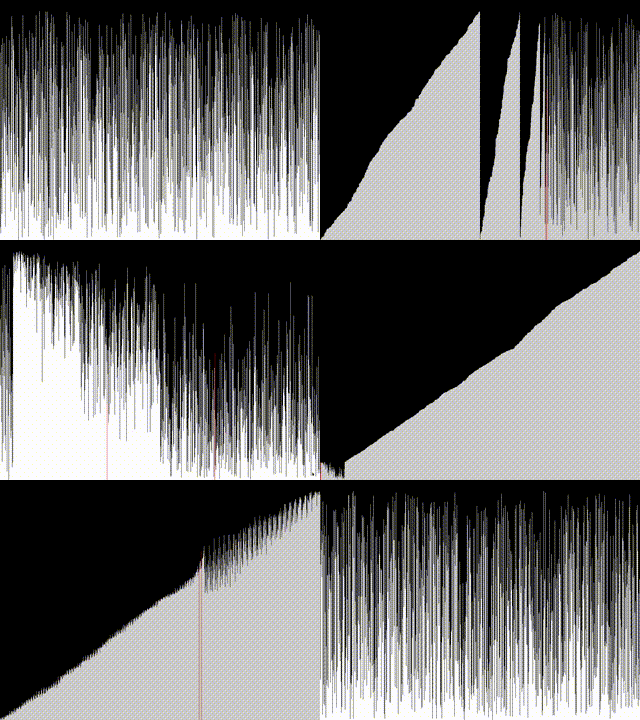
A visual tool that demonstrates sorting algorithms using SDL2. This program shows the step-by-step process of various sorting algorithms as they sort a randomly generated array of bars.
The source code and build instructions are located on my Codeberg
The application is built around a single-threaded SDL2 event loop. The main loop continuously polls events and redraws the state. To prevent the UI from freezing during sorting, the sorting algorithms are invoked directly within the loop but are designed to be non-blocking through a callback-based rendering system.
SDL_Event e;
int running = 1;
while (running) {
    while (SDL_PollEvent(&e)) {
        // Event handling...
    }

    if (sorting_in_progress && sort_func) {
        sort_func(arr, n, swap_callback);
        sorting_in_progress = 0;
        recalc_max();
    }

    render_bars(renderer, arr, n);
    SDL_Delay(0);
}Bars are drawn relative to the maximum value in the current array to ensure full vertical utilization of the viewport. The renderer clears the screen each frame and iterates through the array, calculating bar height based on a normalized ratio.
Highlighting is handled dynamically. When a comparison or swap occurs, specific indices are marked. The renderer checks these indices to override the default white color with red, providing immediate visual feedback of the algorithm’s focus.
void render_bars(SDL_Renderer *renderer, int *arr, int n) {
    SDL_SetRenderDrawColor(renderer, 0, 0, 0, 255);
    SDL_RenderClear(renderer);

    for (int i = 0; i < n; i++) {
        int bar_height = (int)((double)arr[i] / max_val * (WINDOW_HEIGHT - 50));
        SDL_Rect bar = {
            .x = i * bar_width,
            .y = WINDOW_HEIGHT - bar_height,
            .w = bar_width,
            .h = bar_height
        };

        if (i == highlight1 || i == highlight2) {
            SDL_SetRenderDrawColor(renderer, 255, 0, 0, 255);
        } else {
            SDL_SetRenderDrawColor(renderer, 255, 255, 255, 255);
        }
        SDL_RenderFillRect(renderer, &bar);
    }
    SDL_RenderPresent(renderer);
}A critical design choice is the decoupling of sorting logic from the rendering pipeline. Each sorting algorithm accepts a function pointer to a swap_callback. This allows the algorithm to purely focus on array manipulation while the main loop handles all SDL2 state updates.
void bubble_sort(int *arr, int n, void (*swap_callback)(int, int)) {
    for (int i = 0; i < n - 1; i++) {
        for (int j = 0; j < n - i - 1; j++) {
            if (arr[j] > arr[j + 1]) {
                swap_callback(j, j + 1);
                swap(&arr[j], &arr[j + 1]);
            }
        }
    }
}
The swap_callback acts as the synchronization bridge between C memory operations and SDL2’s graphics context:
void swap_callback(int i, int j) {
    highlight1 = i;
    highlight2 = j;
    render_bars(renderer, arr, n);
    highlight1 = highlight2 = -1;
    SDL_Delay(1);
}While most comparison-based sorts (Bubble, Insertion, Selection) follow standard iterative patterns, divide-and-conquer algorithms required slight adaptations to remain compatible with the synchronous callback model.
QuickSort: The recursive helper partitions the array around a pivot. Each swap during partitioning triggers the visual callback. The recursion continues until the sub-array is empty.
MergeSort: Temporary arrays (L and R) are allocated for merging. The callback is invoked during the merge phase to reflect element placement, though note that MergeSort is fundamentally not a swap-based sort, so the visualization represents element movement rather than direct swaps.
RadixSort & CountingSort: These non-comparison sorts operate on digit extraction or frequency mapping. Because they rearrange elements in bulk passes rather than pairwise comparisons, the visual feedback is less granular, appearing as bulk transitions between states.
The visualiser dynamically manages memory for algorithms that require auxiliary storage. MergeSort allocates temporary arrays on the heap for each merge operation, while BucketSort pre-allocates an array of pointers. Proper free() calls are integrated into the algorithm loops to prevent memory leaks during repeated array resets.